When the SDK Isn't Ready: Why I Integrated Ottu Payment Gateway in Flutter with WebView
A real-world story of solving payment integration challenges in a production Flutter app.
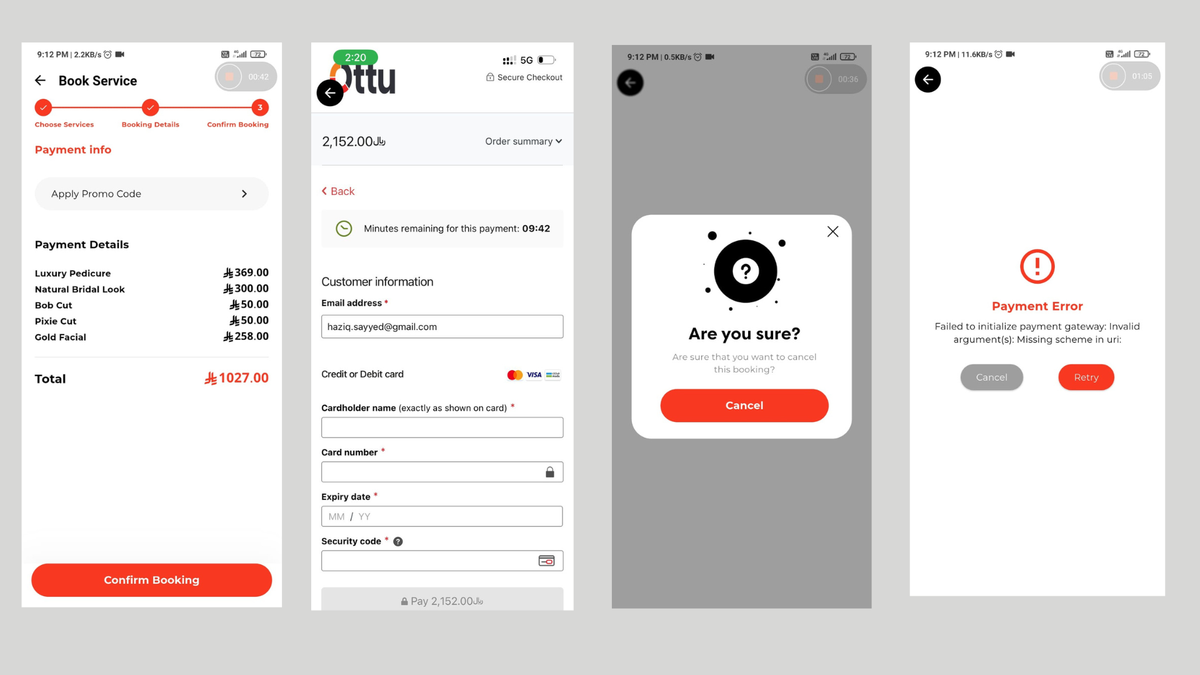
A real-world story of solving payment integration challenges in a production Flutter app
Payment gateway integration failed. SDK crashes on launch. Deadline in one week. Client expecting a demo.
Sound familiar?
This was my reality while building a Dubai-based salon marketplace app. The client required Ottu—a payment gateway popular in Saudi Arabia—for regulatory compliance. The Flutter SDK existed, but it wasn't ready for production. Redirecting to a browser would kill the user experience.
I needed a solution that worked now and could be upgraded later.
Here's how I shipped a production-ready payment integration using WebView when the official SDK wasn't ready—and built it so I could swap to the native SDK seamlessly once it stabilizes.
TL;DR
The Problem: Ottu's Flutter SDK was incomplete and crashing. Browser redirects would ruin UX.
The Solution: WebView integration with URL interception for in-app payments, wrapped in a swappable architecture.
The Result: Production-ready payment flow in one week, with zero refactoring needed when the SDK is ready.
Key Takeaway: Sometimes the "temporary" solution that ships reliably beats the "proper" solution that's still in development.
The Challenge: Payment Gateway or Payment Headache?
The project was straightforward on paper: integrate Ottu, a payment gateway popular in the Middle East (especially Saudi Arabia). The client specifically chose Ottu for its compliance with Saudi regulations and their partnership benefits. Simple enough, right?
Spoiler alert: It wasn't.
Act 1: The SDK That Wasn't (Quite) There
Like any sensible developer, I started with the official approach: their Flutter SDK. Here's where things got interesting.
Problem #1: No pub.dev Package
The first red flag was that there was no official package on pub.dev. Instead, we had to add the GitHub repo directly to pubspec.yaml:
dependencies:
  flutter:
    sdk: flutter

  ottu_flutter_checkout:
    git:
      url: https://github.com/ottuco/ottu-flutter.git
      ref: main
Okay, not ideal, but workable. Many SDKs start this way during development.
Problem #2: The Branch Maze
The repo had two branches:
main- Required Swift Package Manager (which I didn't have on Windows)ios-no-release- Android-only support
I went with ios-no-release since we were prioritizing Android first. But here's where it got painful.
Problem #3: The Crashes
The SDK kept crashing. Native plugins weren't properly implemented. Error messages were cryptic. I spent two days trying to make it work, and honestly? I was getting frustrated.
// The error I kept seeing
Missing implementation for native method channel
Swift Package Manager required for iOS
At this point, I had a decision to make.
Act 2: The Browser Redirect (That I Almost Chose)
The obvious fallback was to redirect users to the browser for payment. Ottu provides a checkout URL that works perfectly in any browser. Launch the URL, user completes payment, deep link back to the app.
But here's why I didn't go that route:
- User Experience Nightmare: Users hate leaving an app mid-checkout. It breaks the flow.
- Security Concerns: Once in the browser, we lose control. Users could bookmark the page, share it, or worse.
- Deep Linking Complexity: Ensuring the app reopens correctly after payment? That's its own can of worms.
- Can't Customize UI: The browser experience would look nothing like our app.
There had to be a better way.
Act 3: The WebView Solution (That Actually Worked)
Then it hit me: What if we keep the browser experience, but inside the app?
WebView could give us:
- ✅ In-app experience (no leaving the app)
- ✅ Control over navigation and security
- ✅ Ability to intercept the redirect URL
- ✅ Customizable loading states and error handling
- ✅ Same checkout URL that Ottu already supports perfectly
The Architecture: Building for the Future
Here's the thing: I knew Ottu would eventually fix their SDK (I confirmed with their team they're actively working on it). So I needed an architecture that would let me swap implementations without rewriting the entire payment flow.
The Solution: Identical Widget Interfaces
I created two payment widgets with the exact same constructor and parameters:
// SDK Version (for future use)
class BookingPaymentView extends StatefulWidget {
  const BookingPaymentView({
    super.key,
    required this.params,
  });

  final BookingPaymentViewParams params;
  // ... implementation
}

// WebView Version (current production)
class OttoPaymentWebView extends StatefulWidget {
  const OttoPaymentWebView({
    super.key,
    required this.params,
  });

  final WebViewBookingPaymentViewParams params;
  // ... implementation
}
Both widgets accept identical parameters: payment session details and three callbacks (success, error, cancel). This makes them true drop-in replacements for each other.
Since we use go_router, swapping them is literally a one-line change:
// Current implementation
context.push(
  AppRoutes.bookingPaymentWebView,
  extra: WebViewBookingPaymentViewParams(
    paymentSession: paymentSession,
    onPaymentComplete: (context) { /* ... */ },
    onPaymentCancel: (context) { /* ... */ },
    onPaymentError: (context) { /* ... */ },
  ),
);

// Future SDK implementation (when ready)
context.push(
  AppRoutes.bookingPaymentSDK,  // Just change this route
  extra: BookingPaymentViewParams(  // Same params structure
    paymentSession: paymentSession,
    onPaymentComplete: (context) { /* ... */ },
    onPaymentCancel: (context) { /* ... */ },
    onPaymentError: (context) { /* ... */ },
  ),
);
The WebView Implementation: Key Decisions
bool _isAllowedUrl(String url) {
  final uri = Uri.parse(url);

  // Allow Ottu domains only
  if (uri.host.contains('ottu.net') || uri.host.contains('ottu.com')) {
    return true;
  }

  // Allow HTTPS URLs only
  if (uri.scheme == 'https') {
    return true;
  }

  return false;
}
We validate every navigation request. If it's not Ottu or HTTPS, we block it.
2. Intercepting the Success Redirect
Here's the clever part. Ottu redirects to a success URL after payment. Instead of letting the WebView navigate there, we intercept it:
NavigationDecision _handleNavigation(String url) {
  log('WebView Navigation: $url');

  // Intercept the redirect URL
  if (_isRedirectUrl(url)) {
    log('Redirect URL intercepted: $url');
    _processPaymentResult(url);
    return NavigationDecision.prevent;  // Don't navigate
  }

  if (_isAllowedUrl(url)) {
    return NavigationDecision.navigate;
  }

  return NavigationDecision.prevent;
}

bool _isRedirectUrl(String url) {
  return url.startsWith(widget.params.paymentSession.redirectUrl) ||
         url.contains(widget.params.paymentSession.redirectUrl);
}

void _processPaymentResult(String url) {
  log('Processing payment result for URL: $url');
  _canPop.value = true;
  widget.params.onPaymentComplete(context);
}
When Ottu tries to redirect to our success URL, we catch it, mark payment as complete, and trigger our success callback. The user never sees a weird redirect page.
3. User Experience Polish
Widget _buildLoadingView() {
  return Container(
    color: Colors.white,
    child: Center(
      child: Column(
        mainAxisAlignment: MainAxisAlignment.center,
        children: [
          CircularProgressIndicator(),
          const SizedBox(height: 16),
          Text('Loading Payment Gateway...'),
          const SizedBox(height: 8),
          Text(
            'Please wait while we securely connect to Ottu',
            textAlign: TextAlign.center,
          ),
        ],
      ),
    ),
  );
}
Custom loading states make it feel native. Users don't see a blank WebView loading.
4. Error Handling
String _getUserFriendlyErrorMessage(WebResourceError error) {
  if (error.description.contains('ERR_SSL_PROTOCOL_ERROR')) {
    return 'Network connection issue. Please check your internet.';
  } else if (error.description.contains('ERR_INTERNET_DISCONNECTED')) {
    return 'No internet connection. Please check your network.';
  } else if (error.description.contains('timeout')) {
    return 'Connection timed out. Please try again.';
  }
  return error.description;
}
We translate technical errors into human language.
5. Preventing Accidental Exits
late final ValueNotifier<bool> _canPop;

@override
Widget build(BuildContext context) {
  return ValueListenableBuilder<bool>(
    valueListenable: _canPop,
    builder: (context, canPop, child) {
      return PopScope(
        canPop: canPop,
        onPopInvokedWithResult: (didPop, result) {
          // Show confirmation dialog if trying to exit mid-payment
        },
        child: Scaffold(/* ... */),
      );
    },
  );
}
Users can't accidentally back out of payment. We show a confirmation dialog first.
The Backend Safety Net
Here's something crucial: We don't trust client-side payment confirmation.
[DIAGRAM PLACEHOLDER: Payment verification flow showing client + server interaction]
After the WebView triggers success, here's what actually happens:
Client Side (WebView):
- Intercept redirect URL ✓
- Trigger success callback ✓
- Show success UI to user ✓
Server Side (The Real Verification): 4. Backend webhook receives payment status from Ottu ✓ 5. Backend updates booking status ✓ 6. App fetches updated booking to confirm ✓
Why this matters: Even if someone manipulates the WebView or intercepts the redirect, the backend won't confirm payment without Ottu's webhook. All our backend APIs require auth tokens, adding another security layer.
Handling Edge Cases
What if the user closes the app mid-payment? Or their internet dies?
The webhook saves us. Since all critical booking data is already saved before payment (user details, services, time slot), the backend can update payment status independently via Ottu's webhooks. When the user reopens the app, they'll see the correct booking status—no lost payments, no confusion.
The Clean Architecture Setup
We're using BLoC pattern with clean architecture, which keeps business logic separate from UI:
presentation/
├── bloc/
│   └── booking_form_bloc/        // Handles payment session creation
├── view/
│   ├── booking_form_view.dart    // Orchestrates the flow
│   ├── otto_payment_webview.dart // Current WebView (production)
│   └── booking_payment_view.dart // Future SDK version (ready to swap)
When Ottu's SDK is stable, migrating is three steps:
- Update the route in
booking_form_view.dart - Test the SDK implementation
- Deploy
No refactoring. No rewriting business logic. Just swap the widget.
Real Talk: The Tradeoffs
Let me be honest about the downsides:
Performance
WebView is slower than native. The checkout page takes 2-3 seconds to load. With a native SDK, it would be instant. Users notice this.
Dependency
We're dependent on Ottu's web checkout. If they change their web UI, we have to adapt. With a native SDK, we'd have more control.
Bundle Size
The webview_flutter package adds ~2-3 MB to the app. Not huge, but not nothing.
No Customization
We can't customize Ottu's payment form. It's their UI, their UX. We just load it.
But you know what? It works. And it works reliably. For a production app with real users and real money, "works reliably" beats "theoretically better" every time.
"Build for the future, ship for today. That's the difference between code that exists in a GitHub repo and code that exists in production."
The Testing Journey
Ottu provides a sandbox environment with test credentials—and trust me, you want to use it. I spent three solid days testing every possible scenario:
Payment Flows Tested:
- ✅ Successful payments (various card types)
- ✅ Failed payments (declined cards, insufficient funds)
- ✅ Network interruptions mid-payment
- ✅ User closing app during payment
- ✅ Multiple rapid payment attempts (double-tap protection)
- ✅ Different payment methods (cards, wallets, local payment options)
The result? The WebView handled all of it gracefully. Ottu's web checkout is battle-tested, which is exactly why this approach works.
Timeline: How Long Did This Take?
Total time: 1 week for both customer and provider apps.
Day 1-2: Attempting SDK integration, hitting walls
Day 3: Research and planning WebView approach
Day 4-5: Implementation and initial testing
Day 6-7: Thorough testing, edge case handling, polishing UX
Could I have been faster if I'd gone straight to WebView? Maybe. But those two days of SDK struggles taught me exactly what NOT to do, which informed the WebView architecture. Sometimes detours teach you the best shortcuts.
Lessons Learned
1. Don't Fight Incomplete SDKs Too Long
If an SDK isn't working after a day or two, look for alternatives. Your deadline matters more than the "correct" solution.
2. Build for Change
I knew the SDK would eventually be ready. Building with swappable implementations saved future refactoring.
3. Security in Layers
Client-side validation + server-side verification = sleep well at night.
4. User Experience > Technical Perfection
WebView isn't as fast as native, but it's infinitely better than redirecting to a browser.
5. Document Your Workarounds
This article is partly for you, partly for future me. When that SDK is ready, I'll need to remember why I made these decisions.
What's Next?
Ottu's team confirmed they're actively working on the SDK. When it's stable:
- I'll create the SDK widget implementation
- Run parallel testing (WebView vs SDK)
- Gradually roll out SDK to users
- Monitor crash reports and payment success rates
- Fully migrate if SDK proves more reliable
Until then? The WebView solution is in production, processing real payments, and working beautifully.
Should You Use This Approach?
Use WebView if:
- ✅ The payment gateway's SDK is buggy or incomplete
- ✅ You need a working solution NOW
- ✅ The gateway provides a solid web checkout
- ✅ You can't wait months for SDK updates
- ✅ In-app experience is important to your UX
Wait for the SDK if:
- ❌ You have flexible deadlines
- ❌ Performance is absolutely critical
- ❌ You need deep customization of the payment UI
- ❌ The SDK is stable but just not documented well
Key Technologies Used
If you want to implement this approach, here's what you'll need:
Core Dependencies:
webview_flutter(^4.0.0) - Handles the WebView renderingflutter_bloc(^8.0.0) - State management (optional, but recommended)go_router(^6.0.0) - Navigation with easy route swapping
Architecture Pattern:
- Clean Architecture with BLoC for separation of concerns
- Repository pattern for payment API calls
- Webhook verification on backend (Node.js/Python/whatever you use)
Ottu Integration:
- Checkout API for session creation
- Webhook endpoint for payment confirmation
- Sandbox environment for testing
The complete code samples throughout this article are production-ready. The key files you'd need to create are:
payment_webview.dart- The WebView wrapper (shown in "Intercepting the Success Redirect")payment_params.dart- Parameter models for both SDK and WebView- Backend webhook handler - To verify payment status from Ottu
Final Thoughts
Payment integrations are rarely straightforward. SDKs break. Docs are incomplete. Deadlines loom. Clients need working solutions.
The real skill isn't writing perfect code—it's making pragmatic decisions under constraints. WebView wasn't my first choice, but it was the right choice for this project at this time.
Here's what I learned: Perfect is the enemy of shipped.
Could I have waited for the SDK? Sure. Could I have built a native implementation from scratch? Probably. But neither would have gotten the app to market in one week with a payment flow that actually works.
Sometimes the "temporary" solution that ships and works reliably is better than the "proper" solution that's still being debugged three weeks later—especially when you've built it so the "proper" solution can slot right in when ready.
That's the real lesson here: Build bridges, not walls. Your code should adapt to reality, not fight it.
Have you faced similar integration challenges? What's your story of shipping when the tools weren't ready? Drop a comment—I'd love to hear how you solved it.
If this helped you avoid a payment integration nightmare, give it a clap 👏 and share it with your fellow Flutter devs.
Building something with Flutter? Connect with me on [LinkedIn/Twitter/GitHub - add your links] or check out my other articles on production Flutter development.
Happy coding, and remember: shipped beats perfect. 🚀
Additional Resources
- Ottu Official Documentation
- Ottu Flutter SDK GitHub
- webview_flutter Package
- Clean Architecture in Flutter