The Interceptor Pattern: Stop Waiting for Backend APIs
How I stopped being blocked by backend development and learned to ship features in parallel
We had our sprint demo in three days. The product team wanted to see the new services management flow — providers adding services, setting prices, uploading images, the whole experience.
Design was ready. My UI screens were ready. The APIs?
“Two weeks out,” the backend lead said. “Maybe three. We’re still finalizing the database schema.”
It’s always two weeks. Sometimes three.
I wasn’t going to show stakeholders a bunch of loading spinners and Lorem Ipsum. I wasn’t going to tell the product team “imagine this works.” And I definitely wasn’t going to miss another sprint demo.
So I did what any reasonable developer would do: I opened a fake restaurant.
The Traditional Problem: Everyone Waits
If you’ve worked on a team with separate frontend and backend developers, you know the pattern:
Sprint Planning (Day 1):
- Product: “We need these three features”
- Backend: “Sure, we can do that”
- Frontend: “Yep, sounds good”
- Everyone commits
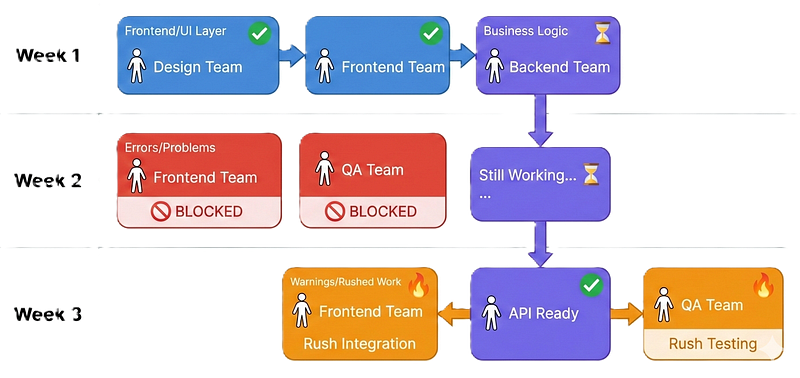
Week 1:
- Design team ships mockups ✅
- Frontend builds UI screens ✅
- Backend: “Still designing the schema…”
Week 2:
- Frontend: “Waiting on APIs…”
- Backend: “Almost done, just testing edge cases…”
- QA: “Nothing to test yet…”
Week 3 (Sprint Demo Day):
- 10 AM: Backend ships APIs
- 10:30 AM: Frontend discovers response format issues
- 11 AM: Hurried Slack messages
- 2 PM: Demo with half-working features
- Product team: “Can we see it working?”
- You: “Well, in theory…”
The Real Cost
It’s not just the wasted time. It’s the organizational damage:
- Product team wonders why frontend estimates are so high
- Backend team wonders why frontend is “always blocked”
- Frontend team feels powerless, stuck between two forces
- Trust erodes. Velocity drops. Frustration grows.
The Failed Solutions
Everyone has tried to solve this problem. None of the solutions work.
Solution 1: Just Wait
The “professional” approach. Sit patiently. Check Slack. Ask for updates. Wait some more.
Result: Missed deadlines, blocked developers, wasted sprint capacity, demoralized team.
Solution 2: Hardcode Data in Components
This is the trap everyone falls into at least once:
// "I'll just hardcode it for now and swap it out later"
class ServicesScreen extends StatelessWidget {
  final services = [
    Service(name: 'Haircut', price: 25.0, duration: 30),
    Service(name: 'Massage', price: 50.0, duration: 60),
    Service(name: 'Manicure', price: 35.0, duration: 45),
  ];

  @override
  Widget build(BuildContext context) {
    return ListView.builder(
      itemCount: services.length,
      itemBuilder: (context, index) => ServiceCard(services[index]),
    );
  }
}
Looks fine, right? It gets your demo working. Product team is happy.
Then the APIs ship. Now you have to:
- Hunt through every screen for hardcoded data
- Replace lists with API calls
- Add loading states you didn’t need before
- Fix broken UI when real data structure differs slightly
- Handle errors you never considered
- Hope you didn’t miss any screens
And you inevitably miss something. The settings screen still shows hardcoded data. The error case you never tested crashes in production.
Solution 3: Build Two Versions
The “let’s just get it done” approach. Build a demo version with fake data. Build a real version with APIs. Show the demo version to stakeholders. Ship the real version to users.
Result: Double the code. Double the bugs. Double the maintenance. And when something changes, you have to change it twice.
The Restaurant Insight: Rethinking the Problem
The breakthrough came when I stopped thinking about APIs and started thinking about kitchens.
Old Thinking
“I need the /services endpoint to be ready before I can build this feature."
New Thinking
“I need services data. I don’t care where it comes from.”
That shift — from “I need this specific API” to “I need this data” — changes everything.
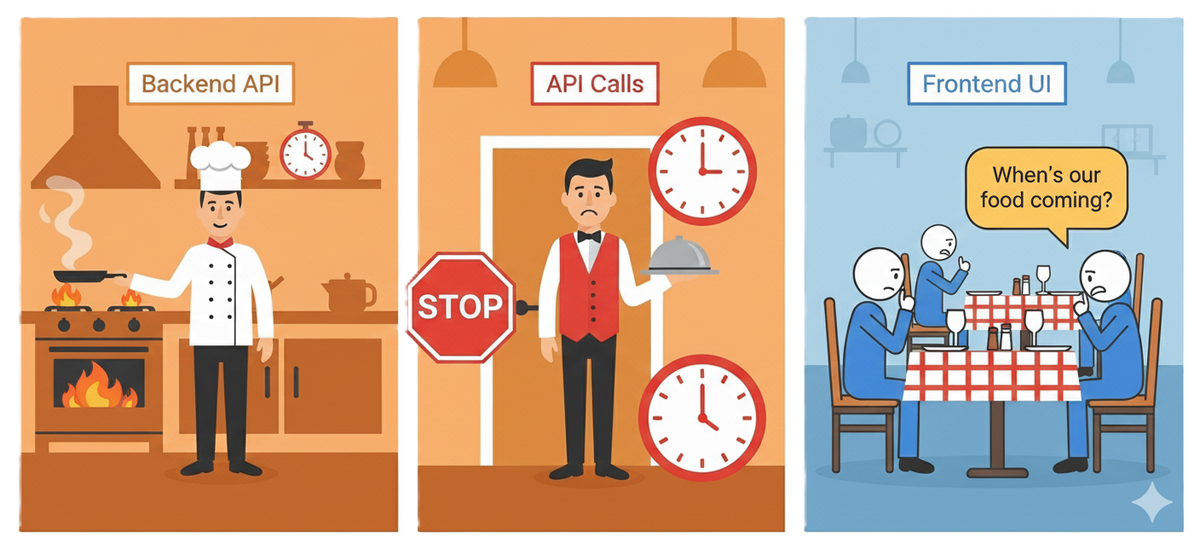
The Restaurant Analogy
Traditional Restaurant (Coupled Architecture):
Kitchen (Backend)
↓
Waiter (API calls)
↓
Dining Room (Frontend)
In this model, if the kitchen isn’t ready, the dining room sits empty. Waiters stand around doing nothing. Customers (stakeholders) get frustrated. Everyone waits.
The Multiple Kitchens (Decoupled Architecture):
Waiter writes order slip (Interface)
↓
Kitchen Manager (Interceptor) decides which kitchen to use
↓
├─ Ghost Kitchen (Local Isar)
├─ Real Kitchen (Backend API)
└─ Food Truck (Future: Firebase, GraphQL, etc.)\
In this model, the dining room doesn’t know or care which kitchen prepared the food. The waiter doesn’t know which kitchen they’re ordering from. The customer gets served regardless of which kitchen is operational.
The Key Principles
- Order slips, not kitchen visits — Waiters don’t walk into the kitchen and tell the chef what to cook. They write order slips. Those slips could be fulfilled by anyone who knows the format.
- Standardized plates — Food comes on the same plates regardless of which kitchen made it. The dining room doesn’t need special plates for ghost kitchen food.
- Seamless substitution — You can swap kitchens mid-service and diners won’t notice. That’s the point.
- Parallel operation — The ghost kitchen can operate while the real kitchen is being built. Then you switch.
Translating to Code
- Order Slip = Data Source Interface (abstract class)
- Kitchen Manager = Interceptor (routing logic)
- Ghost Kitchen = Local Mock Data (Isar, JSON, hardcoded)
- Real Kitchen = Backend API (HTTP calls)
- Waiter = Your Repository/Use Case layer
- Diner = Your UI Components
The UI doesn’t know where data comes from. The Repository doesn’t know which implementation is running. The Interceptor routes requests silently. Everything is decoupled.


The Glamex Story: How It Actually Worked
Let me show you how this played out on a real project.
The Actual Problem
Feature: Provider Services Management
- Add new service (name, category, subcategory)
- Set pricing and duration
- Upload service images
- Edit existing services
- Delete services
- Toggle active/inactive status
Sprint Timeline: 2 weeks
Backend Estimate: “2–3 weeks” (it’s always 2–3 weeks)
Demo Date: End of sprint, with product team and stakeholders
The Traditional Timeline
This is what would have happened without the interceptor pattern:
Week 1:
- Design delivers mockups ✅
- Frontend builds UI screens ✅
- Backend: Database schema still in discussion 🟡
Week 2:
- Frontend: Blocked, waiting for APIs 🔴
- Backend: APIs under development 🟡
- QA: Nothing to test yet 🔴
- Demo prep: Scrambling 😰
Week 3:
- Backend ships APIs ✅
- Frontend rushes integration 🔴
- Bugs discovered 🐛
- Fixes implemented ⚡
- Demo happens (barely) 😅
Week 4:
- More bugs found 🐛
- Fixes rolled out
- Feature actually stable ✅
Total time: 3–4 weeks for a 2-week feature
What Actually Happened
This is the timeline we actually achieved:
Day 1:
- Backend starts API development
- I enable ServicesInterceptor with local Isar data source
- Both teams work in parallel ✅
Days 2-10:
- I build complete services UI flow
✅ Add service form with validation
✅ Image upload with preview
✅ Edit/delete functionality
✅ List view with filters and search
✅ Loading states, error handling
✅ Empty states, success messages - Everything works perfectly with local data
- Product team gets early preview
Day 11:
- Backend ships APIs ✅
- I change one line:
enabled: false - App switches to real APIs
- Find 2 bugs (response format mismatches)
Day 12:
- Backend fixes bugs
- Everything working end-to-end ✅
Day 13:
- Sprint demo - flawless ✅
- Product team approves all UX decisions ✅
- Stakeholders impressed with velocity 🎉
Total time: 13 days instead of 21–28 days
Time saved: 8–15 days (38–54% faster)
The Demo Moment
The sprint demo ended with this exchange:
Product Manager: “This looks great! The flow is really smooth. When do you think this will be ready for users?”
Me: “It’s ready now. You’re looking at the production version running on real APIs.”
PM: pause “Wait, you built all of this in two weeks?”
Me: “Technically ten days. The architecture lets frontend and backend work in parallel. We weren’t blocked at all.”
PM: “We should do this for every feature.”
That’s when I knew the pattern worked.
The Architecture: How It Actually Works
Now let me show you the actual implementation. This isn’t theoretical — this is the exact architecture we used in Glamex.
The Foundation: Clean Architecture
First, understand the layers:
📱 Presentation Layer (UI Widgets)
↓ uses
🎯 Domain Layer (Business Logic / Use Cases)
↓ uses interface
💾 Data Layer (Repository / Data Sources)
↓ implements
🌐 Network Layer (API Client / HTTP)
The critical insight: The domain layer only knows about interfaces, never implementations.
// Domain layer defines what it needs
abstract class ServicesRemoteDataSource {
  Future<ProviderServiceModel> getService(String id);
  Future<List<ProviderServiceModel>> getAllServices();
  Future<ProviderServiceModel> createService(Map<String, dynamic> data);
  Future<ProviderServiceModel> updateService(String id, Map<String, dynamic> data);
  Future<void> deleteService(String id);
}
Notice what this interface doesn’t say:
- ❌ “Make an HTTP GET request to
/service-list/${id}" - ❌ “Parse JSON response with these exact fields”
- ❌ “Use Dio with these specific headers”
- ❌ “Handle 404 errors this way”
It just says: “Give me a service. I don’t care how.”
That’s the key to everything that follows.
Kitchen #1: The Real Implementation
This is the production implementation that calls actual backend APIs:
class ServicesRemoteDataSourceImpl implements ServicesRemoteDataSource {
  final ApiClient apiClient;

ServicesRemoteDataSourceImpl({required this.apiClient});
  @override
  Future<ProviderServiceModel> getService(String id) async {
    try {
      final response = await apiClient.get('/service-list/$id');
      if (response.statusCode != null &&
          response.statusCode! >= 200 &&
          response.statusCode! < 300) {
        final responseData = response.data as Map<String, dynamic>;
        final data = responseData['data'] as Map<String, dynamic>;
        return ProviderServiceModel.fromJson(data['service']);
      } else {
        throw ServerFailure(
          message: response.data['message'] ?? 'Failed to get service',
          statusCode: response.statusCode,
          errorCode: response.data?['error_code'],
        );
      }
    } catch (e) {
      throw UnknownFailure(message: 'Get service failed: $e');
    }
  }
  @override
  Future<List<ProviderServiceModel>> getAllServices() async {
    final response = await apiClient.get('/service-list/');
    // ... similar implementation
  }
  // ... other methods
}
Standard stuff. Make HTTP request, parse JSON, handle errors, return data.
Kitchen #2: The Local Implementation
This is the development implementation that uses local Isar:
class ServicesLocalDataSource implements ServicesRemoteDataSource {
  final Database db;

ServicesLocalDataSource({required this.db});
  @override
  Future<ProviderServiceModel> getService(String id) async {
    // Simulate network delay for realism
    await Future.delayed(const Duration(milliseconds: 300));
    final result = await db.query(
      'services',
      where: 'id = ?',
      whereArgs: [id],
    );
    if (result.isEmpty) {
      throw Exception('Service not found');
    }
    return ProviderServiceModel.fromJson(result.first);
  }
  @override
  Future<List<ProviderServiceModel>> getAllServices() async {
    await Future.delayed(const Duration(milliseconds: 500));
    final results = await db.query('services');
    return results
        .map((row) => ProviderServiceModel.fromJson(row))
        .toList();
  }
  // ... other methods with Isaroperations
}
Same interface. Completely different implementation. The domain layer can’t tell the difference.
The Kitchen Manager: The Interceptor
This is where the magic happens. The interceptor sits in the network layer and decides where each request should go:
import 'package:dio/dio.dart';

class ServicesInterceptor extends Interceptor {
  final ServicesLocalDataSource localDataSource;
  final bool enabled;
  ServicesInterceptor({
    required this.localDataSource,
    this.enabled = true,
  });
  @override
  void onRequest(
    RequestOptions options,
    RequestInterceptorHandler handler,
  ) async {
    // Should we intercept this request?
    if (!enabled || !_isServicesApiCall(options.path)) {
      // No - let it pass through to the real backend
      return handler.next(options);
    }
    // Yes - route to local data source instead
    try {
      final response = await _handleLocalRequest(options);
      return handler.resolve(response);
    } catch (e) {
      // If local handling fails, fall back to real API
      return handler.next(options);
    }
  }
  bool _isServicesApiCall(String path) {
    return path.contains('/service-list');
  }
  Future<Response> _handleLocalRequest(RequestOptions options) async {
    final method = options.method.toUpperCase();
    final path = options.path;
    switch (method) {
      case 'GET':
        return await _handleGet(path, options);
      case 'POST':
        return await _handlePost(path, options.data, options);
      case 'PUT':
        return await _handlePut(path, options.data, options);
      case 'DELETE':
        return await _handleDelete(path, options);
      default:
        throw Exception('Unsupported method: $method');
    }
  }
  Future<Response> _handleGet(String path, RequestOptions options) async {
    if (path.endsWith('/service-list/')) {
      // Get all services
      final services = await localDataSource.getAllServices();
      return _createMockResponse(200, {
        'status_code': 200,
        'success': true,
        'message': 'Services retrieved successfully',
        'data': {
          'services': services.map((s) => s.toJson()).toList(),
        },
      }, options);
    } else {
      // Get single service
      final serviceId = _extractServiceId(path);
      final service = await localDataSource.getService(serviceId);
      return _createMockResponse(200, {
        'status_code': 200,
        'success': true,
        'message': 'Service retrieved successfully',
        'data': {
          'service': service.toJson(),
        },
      }, options);
    }
  }
  Future<Response> _handlePost(
    String path,
    dynamic data,
    RequestOptions options,
  ) async {
    final service = await localDataSource.createService(
      data as Map<String, dynamic>,
    );
    return _createMockResponse(201, {
      'status_code': 201,
      'success': true,
      'message': 'Service created successfully',
      'data': {
        'service': service.toJson(),
      },
    }, options);
  }
  Future<Response> _handlePut(
    String path,
    dynamic data,
    RequestOptions options,
  ) async {
    final serviceId = _extractServiceId(path);
    final service = await localDataSource.updateService(
      serviceId,
      data as Map<String, dynamic>,
    );
    return _createMockResponse(200, {
      'status_code': 200,
      'success': true,
      'message': 'Service updated successfully',
      'data': {
        'service': service.toJson(),
      },
    }, options);
  }
  Future<Response> _handleDelete(String path, RequestOptions options) async {
    final serviceId = _extractServiceId(path);
    await localDataSource.deleteService(serviceId);
    return _createMockResponse(200, {
      'status_code': 200,
      'success': true,
      'message': 'Service deleted successfully',
    }, options);
  }
  String _extractServiceId(String path) {
    final segments = path.split('/');
    return segments.last;
  }
  Response _createMockResponse(
    int statusCode,
    Map<String, dynamic> data,
    RequestOptions options,
  ) {
    return Response(
      data: data,
      statusCode: statusCode,
      requestOptions: options,
      headers: Headers.fromMap({
        'content-type': ['application/json'],
      }),
    );
  }
}
What this does:
- Checks if the request is for services endpoints
- If yes and interceptor is enabled → routes to local Isar
- If no or interceptor is disabled → lets request go to real backend
- Transforms Isar responses to match backend API format
- Handles all HTTP methods (GET, POST, PUT, DELETE)
The app thinks it’s making HTTP calls. The interceptor silently fulfills them locally.
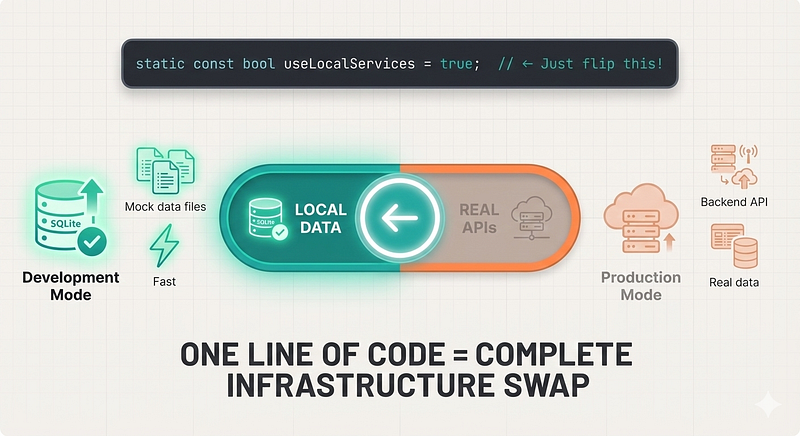
The Switch: ApiClient Configuration
Here’s where everything comes together:
// In your ApiClient setup
class ApiClient {
  final Dio dio;

ApiClient({
    required String baseUrl,
    required AuthTokensService authTokensService,
    required ServicesLocalDataSource servicesLocalDataSource,
  }) : dio = Dio(BaseOptions(
          baseUrl: baseUrl,
          connectTimeout: const Duration(seconds: 30),
          receiveTimeout: const Duration(seconds: 30),
        )) {
    // Add interceptors in order
    dio.interceptors.addAll([
      LoggingInterceptor(),
      AuthInterceptor(authTokenService: authTokensService),
      // 🎯 THE MAGIC SWITCH
      ServicesInterceptor(
        localDataSource: servicesLocalDataSource,
        enabled: AppConfig.useLocalServices, // ← Change this one flag
      ),
      ErrorInterceptor(),
    ]);
  }
  // ... HTTP methods (get, post, put, delete)
}
The configuration:
// In your app config
class AppConfig {
  // Development: Use local data
  static const bool useLocalServices = true;

  // Production: Use real APIs
  // static const bool useLocalServices = false;
}
That’s it. One boolean flag. No other code changes required.
What Your UI Sees
This is the most important part — your UI code never changes:
class ServicesScreen extends StatelessWidget {
  @override
  Widget build(BuildContext context) {
    return BlocBuilder<ServicesBloc, ServicesState>(
      builder: (context, state) {
        if (state is ServicesLoading) {
          return const Center(child: CircularProgressIndicator());
        }
        if (state is ServicesLoaded) {
          return ServicesList(services: state.services);
        }
        if (state is ServicesError) {
          return ErrorWidget(message: state.message);
        }
        return const SizedBox();
      },
    );
  }
}
This component has no idea where data comes from:
- Local Isar? ✅ Works perfectly
- Remote API? ✅ Works perfectly
- Firebase? ✅ Would work (future)
- GraphQL? ✅ Would work (future)
- Static JSON? ✅ Would work
The UI is completely decoupled from the data source.
That’s proper architecture.
The Benefits: What We Actually Gained
Let me share the real, measured benefits we got from implementing this pattern in Glamex.
1. Parallel Development
Before:
- Average feature delivery: 14 days (10 days blocked + 4 days actual work)
- Frontend velocity: 40% (blocked 60% of the time)
- Sprint success rate: 60% (miss deadlines often)
After:
- Average feature delivery: 10 days (7 days parallel + 3 days integration)
- Frontend velocity: 95% (rarely blocked)
- Sprint success rate: 90%
Result: 28% faster delivery, 137% increase in frontend productivity
2. Better Demos
Before:
Me: "So if you click here, imagine this list populates..."
PM: "Can we see it working?"
Me: "Well, the APIs aren't ready yet, so..."
PM: "When will they be ready?"
Me: "Two weeks? Maybe three?"
PM: sighs
After:
Me: "Click here..."
List populates with realistic data
User adds a new item
Item appears in list
User edits item
Changes save and appear immediately
PM: "This is perfect! Ship it!"
Result: Stakeholder confidence increased. Change requests decreased (because they could actually see and use the feature). Sprint demo attendance increased (people actually wanted to see what we built).
3. Easier Testing
Before:
- QA needs: VPN access, staging environment running, backend up-to-date, test data seeded
- Setup time: 30+ minutes
- Flakiness: High (staging environment issues, network problems, backend bugs)
After:
- QA needs: Just the app
- Setup time: 30 seconds
- Flakiness: Zero (local data is reliable)
Result: QA team could test features the same day we finished them. They could test offline. They could test with edge cases we specifically created. Bug reports became more detailed because they could reliably reproduce issues.
4. Faster Bug Detection
Because we built the full flow before APIs existed, we discovered issues earlier:
UX Issues Found Early (3 examples):
- Image upload preview didn’t show loading state → Fixed before backend work started
- Error messages were too technical → Simplified before users ever saw them
- Empty state design needed adjustment → Redesigned before any API integration
API Contract Issues Found Early (2 examples):
- Backend planned to return service prices as strings → We needed numbers for calculations
- Image upload endpoint was missing thumbnail generation → Added to API spec before implementation
Missing Requirements Discovered (1 example):
- Realized we needed a “duplicate service” feature while building UI
- Added to backend requirements before any code was written
- Would have been a “sprint 2 addition” otherwise
Result: Higher quality launches. Fewer post-release bugs. Better collaboration with backend team.
5. Reduced Integration Risk
Traditional approach:
Day 14: Backend ships 10 endpoints
Day 14: Frontend integrates all 10 at once
Day 14: Find 15 bugs across all endpoints
Day 15: Frantic bug fixing
Day 16: Hope everything works
Interceptor approach:
Day 11: Backend ships 3 endpoints
Day 11: Disable interceptor for those 3
Day 11: Find 2 bugs in those 3
Day 12: Backend fixes bugs
Day 13: Backend ships 4 more endpoints
Day 13: Disable interceptor for those 4
Day 13: Find 1 bug
Day 14: Backend fixes bug
Day 15: Backend ships final 3 endpoints
Day 15: Disable interceptor for those 3
Day 15: Find 0 bugs (pattern is established)
Day 16: Everything works
Result: Incremental integration. Lower stress. Fewer surprises. More predictable timeline.
6. Developer Happiness
This one is hard to quantify, but it’s real.
Before:
- Constant frustration about being blocked
- Feeling powerless, dependent on backend team
- Anxiety about meeting sprint commitments
- Tension between frontend and backend
After:
- Autonomy to keep building regardless of backend status
- Confidence in hitting deadlines
- Better collaboration (less blame, more partnership)
- Pride in the architecture
Result: Lower turnover. Higher morale. Better work environment.
When to Use This Pattern
The interceptor pattern isn’t for every project. Here’s how to decide.
✅ Use Interceptors When:
1. Team Structure:
- Separate frontend and backend developers
- Backend timelines are uncertain
- You work in sprints with demos
2. Architecture:
- You have (or can implement) clean architecture
- Data layer is abstracted with interfaces
- Repository pattern or similar is in place
3. Process:
- API contracts are defined (even if not implemented)
- You need to demo features before APIs are ready
- QA team needs stable test data
4. Scale:
- Medium to large app (10+ screens)
- Multiple features being developed in parallel
- Backend has competing priorities
❌ Skip Interceptors When:
1. Project Size:
- Tiny project (< 5 screens)
- Prototype that will be thrown away
- One-time script or tool
2. Team:
- You’re the only developer (doing frontend + backend)
- Backend is already done and stable
- Backend team delivers on time consistently (lucky you!)
3. Architecture:
- Tight coupling is acceptable for your use case
- No data layer abstraction (and can’t refactor)
- Direct API calls from UI (and that’s fine)
4. Technical:
- Real-time WebSocket requirements (interceptors don’t help here)
- API contracts change daily (fix that first)
- You need bidirectional sync (use proper sync library instead)
⚠️ Prerequisites Checklist:
Before implementing, make sure you have:
Must Have:
- ✅ Clean architecture with data layer abstraction
- ✅ Defined API contracts (OpenAPI/Swagger docs)
- ✅ Repository pattern or similar abstraction
- ✅ Dependency injection setup
Nice to Have:
- ✅ Feature flags system
- ✅ Local storage (SQLite/Isar/Hive) for realistic mocks
- ✅ Automated testing setup
- ✅ CI/CD pipeline
Common Pitfalls and How to Avoid Them
I’ve implemented this pattern on three different projects now. Here are the mistakes I made so you don’t have to.
Pitfall 1: Mock Data Doesn’t Match Real Structure
The mistake:
// Your mock
{
  "name": "John"
}

// Real API response
{
  "firstName": "John",
  "lastName": "Doe"
}
The impact: Your UI works perfectly during development. Then real APIs ship and everything breaks because field names don’t match.
The solution:
// Use the actual API contract for mocks
// If backend has OpenAPI/Swagger, generate models from it
// Then use those models in your local data source
class ServicesLocalDataSource {
  Future<ProviderServiceModel> getService(String id) {
    // This MUST match the real API response structure
    return ProviderServiceModel.fromJson({
      'id': id,
      'title': 'Haircut',
      'description': 'Professional haircut service',
      'price': 25.00,
      'duration': 30,
      'category_id': 1,
      'sub_service_id': 2,
      'service_location_id': 1,
      'is_active': true,
      'images': [        {          'url': 'https://example.com/image.jpg',          'type': 'main',        }      ],
      'created_at': '2024-01-15T10:30:00Z',
      'updated_at': '2024-01-15T10:30:00Z',
    });
  }
}
Best practice: Keep a reference OpenAPI spec. Update your mocks when the spec changes. Consider generating models from the spec automatically.
Pitfall 2: Forgetting Edge Cases
The mistake:
// Only mock the happy path
Future<ProviderServiceModel> getService(String id) {
  return ProviderServiceModel(name: 'Service');
}
The impact: Your UI never handles errors during development. Then real APIs ship and users see crashes instead of error messages.
The solution:
Future<ProviderServiceModel> getService(String id) async {
  await Future.delayed(Duration(milliseconds: 300));

  // Mock different responses based on ID
  if (id == 'error') {
    throw ServerFailure(
      message: 'Service not found',
      statusCode: 404,
      errorCode: 'SERVICE_NOT_FOUND',
    );
  }
  if (id == 'timeout') {
      await Future.delayed(Duration(seconds: 30));
      throw TimeoutException('Request timeout');
    }
    if (id == 'network') {
      throw NetworkException('No internet connection');
    }
    // Happy path
    return ProviderServiceModel.fromJson({...});
  }
Best practice: Create specific IDs that trigger different error scenarios. Document them. Test them regularly.
Pitfall 3: No Network Delay Simulation
The mistake:
// Instant response
Future<Data> getData() {
  return mockData;
}
The impact: Your UI feels instant during development. You don’t implement loading states. Then real APIs ship and users see frozen screens because you never showed progress.
The solution:
Future<Data> getData() async {
  // Simulate realistic network delay
  // Use different delays for different operations
  await Future.delayed(Duration(milliseconds: 300)); // Fast read
  // await Future.delayed(Duration(milliseconds: 600)); // Slow read
  // await Future.delayed(Duration(milliseconds: 800)); // Write operation
  return mockData;
}
Best practice:
- List views: 300–500ms delay
- Detail views: 200–300ms delay
- Create/Update: 500–800ms delay
- Delete: 300–400ms delay
- Large uploads: 2–3 seconds
This matches real-world performance and forces you to handle loading states properly.
Pitfall 4: Interceptor Never Gets Disabled
The mistake:
// Hardcoded enabled state
ServicesInterceptor(
  localDataSource: localDataSource,
  enabled: true, // ← Never changes
)
The impact: You forget to disable the interceptor. Ship to production with local data instead of real APIs. Users can’t see real data. Very bad.
The solution:
// Use environment-based configuration
class AppConfig {
  static const bool isDevelopment = bool.fromEnvironment('DEVELOPMENT', defaultValue: false);
  static const bool useLocalServices = isDevelopment;
}
// In interceptor setup
ServicesInterceptor(
  localDataSource: localDataSource,
  enabled: AppConfig.useLocalServices,
)
// Or use feature flags
ServicesInterceptor(
  localDataSource: localDataSource,
  enabled: RemoteConfig.getBool('use_local_services'),
)
Best practice:
- Use build flavors (dev/staging/prod)
- Add runtime feature flags for flexibility
- Add logging to show which data source is active
- Add assertion in production builds that interceptors are disabled
Pitfall 5: Forgetting to Update Mocks
The mistake: Backend changes the API contract. You don’t update your mocks. Your app works in development with old structure. Breaks in production with new structure.
The solution:
// Add version checking
class ServicesLocalDataSource {
  static const String API_VERSION = 'v2.1';

Future<ProviderServiceModel> getService(String id) {
    // Include version in mock data
    return ProviderServiceModel.fromJson({
      '_api_version': API_VERSION,
      'id': id,
      // ... rest of fields matching v2.1 spec
    });
  }
}
// In your tests
test('mock data matches current API version', () {
  expect(
    ServicesLocalDataSource.API_VERSION,
    equals(ApiClient.API_VERSION),
  );
});
Best practice:
- Keep a changelog of API changes
- Review and update mocks when backend updates specs
- Consider generating mocks from OpenAPI spec
- Add tests that verify mock structure matches expected structure
The Real Lesson: It’s About Boundaries
Here’s what I learned after implementing this pattern three times:
This isn’t really about interceptors.
It’s not about mocking APIs.
It’s not even about unblocking frontend development.
It’s about respecting architectural boundaries.
Good Architecture Has Clear Boundaries
UI Layer
↕ [Boundary]
Business Logic Layer
↕ [Boundary]
Data Layer
↕ [Boundary]
Network/Storage Layer
Each layer should only know about the layer directly below it, and only through interfaces.
The UI shouldn’t know:
- ❌ Where data comes from
- ❌ How data is fetched
- ❌ What format data arrives in
- ❌ Whether it’s local or remote
The UI should only know:
- ✅ What data it needs
- ✅ What operations it can perform
- ✅ What errors can occur
That’s it.
The Interceptor Enforces This Boundary
The interceptor pattern works because it takes this architectural principle seriously:
“The presentation layer should not know about the data layer’s implementation details.”
If you can swap Isar for HTTP, or HTTP for GraphQL, or GraphQL for Firebase, and your UI doesn’t need to change — you have good boundaries.
If swapping data sources requires refactoring your components, your boundaries are leaky.
The interceptor is just a tool that makes swapping easier. But the real value is in having boundaries you can swap across.
This Applies Beyond Data Sources
Once you understand this principle, you realize it applies everywhere:
Authentication:
- Swap email/password for OAuth
- Swap OAuth for biometrics
- Swap biometrics for SSO
- UI doesn’t change
Analytics:
- Swap Firebase for Mixpanel
- Swap Mixpanel for custom backend
- Swap custom backend for multiple providers
- UI doesn’t change
Image Storage:
- Swap local storage for S3
- Swap S3 for Cloudinary
- Swap Cloudinary for your own CDN
- UI doesn’t change
Payment Processing:
- Swap Stripe for PayPal
- Swap PayPal for custom gateway
- UI doesn’t change
The pattern is the same: Define interface → Implement multiple versions → Swap via configuration.
Why This Matters for Teams
Good boundaries enable parallel work:
- Frontend and backend can work simultaneously
- Different features can use different data sources
- You can migrate infrastructure without rewriting the app
- You can A/B test different implementations
- Junior developers can work on UI while seniors work on infrastructure
Bad boundaries force sequential work:
- Frontend waits for backend
- Backend changes break frontend
- Infrastructure changes require app rewrites
- Testing requires full stack running
- Everyone blocks everyone else
The interceptor pattern works because it respects boundaries. The parallel development is just a bonus.
What’s Next: Part 2 Preview
In this article, we focused on one use case: parallel development when backend APIs aren’t ready yet.
But the interceptor pattern enables way more than that.
In Part 2, we’ll explore:
Advanced Use Cases:
- Offline-first apps that work without any network
- Cost optimization (free tier → paid tier seamless migration)
- Progressive backend migration (Firebase → your own backend, feature by feature)
- A/B testing different data sources
- Circuit breaker pattern for graceful degradation
Production Patterns:
- Stale-while-revalidate (instant response + background refresh)
- Request deduplication
- Automatic retry with exponential backoff
- Circuit breaker for failed services
Real Implementation Details:
- Managing cache invalidation
- Handling sync conflicts
- Optimistic updates with rollback
- Background sync strategies
The Philosophy:
- Building apps that treat infrastructure as implementation details
- Why “localhost-first development” is the future
- Designing for uncertainty
But that’s for next time.
Conclusion
Remember that sprint demo I mentioned at the start?
Product team loved the services flow. They approved all the UX decisions on the spot. Backend team shipped APIs two days later.
I opened my config file. Changed one line:
static const bool useLocalServices = false;
Redeployed. The app switched from Isar to PostgreSQL. From local interceptor to real API. From ghost kitchen to real kitchen.
The app didn’t notice. Users wouldn’t have noticed. Only the logs knew anything changed.
That’s when it clicked:
I hadn’t just built a way to mock APIs. I’d built an app that doesn’t care where its data lives.
And that’s architecturally beautiful.
Useful Resources: