How I Build the Query System in Flutter with Isar and Firestore and Optimized Fetching and Display…
When I first started building my app, LinkVault — a tool for storing all your URL links in neat, nested collections — I quickly realized…


Building an Efficient Query System in Flutter: Lessons from LinkVault.
WWhen I built LinkVault — a tool for storing URL links in nested collections — I quickly ran into a challenge: Users needed an efficient way to search, filter, and sort potentially thousands of links.
The solution? A powerful query system using Flutter with a local Isar database and cloud storage via Firestore.
In this guide, I’ll share how I built this system, the architectural decisions I made, and the practical optimizations that make it blazing fast.
The Challenge: Handling Large Collections Efficiently
In LinkVault, users can have thousands of links organized into nested collections. The query system needed to support:
- Text searches by name or category
- Date filtering for recently updated items
- Custom sorting options (alphabetical, chronological)
- Pagination for smooth scrolling performance
- JSON field filtering for custom user settings
All while maintaining responsiveness and supporting both offline-first operation and cloud synchronization.
Architecture Overview
Solution Architecture: The Filter Model
At the core of our solution is a simple but powerful class that encapsulates all filter criteria:
class CollectionFilter {
  CollectionFilter({
    /* fields */
  });

  final String? name;
  final String? category;
  final String parentCollection;
  final String? status;
  final Map<String, dynamic>? settings;
  final DateTime? updatedAfter;
  final DateTime? updatedBefore;
  final bool? sortByNameAsc;
  final bool? sortByDateAsc;
  final int? limit;
  final int? offset;

  // Utility methods and copyWith implementation...

  /// Check if any filter is applied
  bool get hasFilters => name != null || category != null || status != null ||
    settings != null || updatedAfter != null || updatedBefore != null;
}
This class serves as the contract between all layers of the application:
- The UI layer sets filter properties based on user input
- The business logic layer processes these filters
- The data layer translates them into database queries
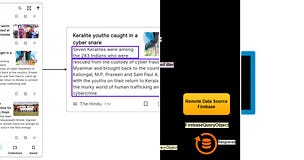
Currently LinkVault is only dependent on the Isar DB for all the data access, as the Firestore database is only for data backup and to fetch data and store it in the local Isar DB if unavailable locally.
Building the Query Builder Helper
To keep query-building logic reusable and clean, I created a QueryBuilderHelper class with specialized methods for both Isar and Firestore:
static isr.QueryBuilder<CollectionModelIsar, CollectionModelIsar,
    isr.QAfterWhereClause> buildCollectionModelIsarQuery(
  CollectionFilter filter,
  isr.IsarCollection<CollectionModelIsar> isar,
) {
  // Start with the base query and first where condition
  final query = isar.where().parentCollectionEqualTo(filter.parentCollection);

  // Apply name filter if provided
  var filterBuilder = query.filter();
  if (filter.name?.isNotEmpty ?? false) {
    filterBuilder = filterBuilder.nameContains(filter.name!, caseSensitive: false);
  }

  // Apply category filter if provided
  if (filter.category?.isNotEmpty ?? false) {
    filterBuilder = filterBuilder.categoryEqualTo(filter.category!);
  }

  // Apply sorting
  if (filter.sortByDateAsc != null) {
    filter.sortByDateAsc!
        ? query.sortByUpdatedAt()
        : query.sortByUpdatedAtDesc();
  }

  // Additional filtering logic...

  return query;
}

// SIMILARLY FOR FIREBASE
This approach keeps the query-building logic separate from both the UI and data models, making it easier to maintain and test.
Database Model Design
For efficient querying, I designed the Isar model with carefully selected indexes:
@collection
class CollectionModelIsar {
  Id? id; // Auto-increment ID for Isar

@Index()
  late String firestoreId;

  @Index()
  late String userId;

  @Index()
  late String parentCollection;

  @Index()
  late String name;

  @Index()
  late DateTime createdAt;
  @Index()
  late DateTime updatedAt;

  // Factory constructor to transform data from Firestore model
  factory CollectionModelIsar.fromCollectionModel(CollectionModel collectionModel) {
    return CollectionModelIsar(
           // fields mapping
      );
  }
}
By indexing the fields that users frequently search on, I dramatically improved query performance — especially for large datasets.
Architectural Approaches: Two Options
I explored two different architectural approaches to implementing this query system:
1. Clean Architecture (Repository & Bloc)
With this approach, the data flows like this:
UI → Bloc → Repository → Data Sources (Local & Remote)

The user interacts with filter controls in the UI, which dispatch events to a Bloc. The Bloc then calls repository methods with the filter parameters. The repository decides whether to fetch from local Isar DB or remote Firestore and returns filtered results.
// Example from the Bloc layer
Future<void> fetchMoreSubCollections({
  required String parentCollectionId,
  required String userId,
  required bool? isAtoZFilter,
  required bool? isLatestFirst,
}) async {
  _collQueueManager.addTask(
    () => _fetchMoreSubCollections(
      parentCollectionId: parentCollectionId,
      userId: userId,
      isAtoZFilter: isAtoZFilter,
      isLatestFirst: isLatestFirst,
    ),
  );
}

// Implementation details in the repository layer
Future<Either<Failure, List<CollectionModel>>>
  fetchSubCollectionsListByFilter({
    required CollectionFilter filter,
    required String userId,
}) async {
  try {
    // First try local DB with filters
    final localCollection = await _collectionLocalDataSourcesImpl
      .fetchCollectionWithFilters(filter);

    // If local fails, try remote DB
    final collections = localCollection ??
      await _remoteDataSourcesImpl.fetchCollectionsFromRemoteDB(
        filter: filter,
        userId: userId,
      );

    // Cache remote results locally if needed
    // ...

    return Right(collections);
  } catch (e) {
    return Left(ServerFailure(/*...*/));
  }
}
Advantages:
- Clear separation of concerns
- High testability
- Better scalability for complex apps
- Independent evolution of layers
Disadvantages:
- More boilerplate code
- Higher initial complexity
2. Model Extensions Approach
A simpler alternative is to add query functionality directly to the model using Dart extensions:
extension CollectionModelIsarQueries on CollectionModelIsar {
  static Future<List<CollectionModelIsar>> getFiltered(
    CollectionFilter filter
  ) async {
    final isar = Isar.getInstance()!;
    // Build and execute query based on filter
    return getFilteredCollections(filter, isar);
  }
}- Advantages:
- Less code, faster to implement
- Easier to understand for small teams
- Great for quick prototyping
Disadvantages:
- Mixes data and query concerns
- Less flexible for complex requirements
- Harder to test in isolation
Optimizing List Performance
To handle potentially large collections, I implemented three key optimizations:
1. Pagination with Scroll Detection
Instead of loading all items at once, LinkVault fetches collections in batches of 16, loading more as the user scrolls:
if (_scrollController.position.pixels >=
    _scrollController.position.maxScrollExtent) {
  // Fetch more collections when user reaches bottom
  await _fetchMoreCollections();
}
2. Async Queue Manager
To prevent overwhelming the main thread with multiple concurrent requests (especially during fast scrolling), I implemented an AsyncQueueManager that processes fetch requests in sequence at the bloc layer.
_collQueueManager.addTask(
  () => _fetchMoreSubCollections(
    parentCollectionId: parentCollectionId,
    userId: userId,
    isAtoZFilter: isAtoZFilter,
    isLatestFirst: isLatestFirst,
  ),
);
3. Efficient List Updates
When applying filters, I manipulate the existing list without unnecessary reloads:
void _filterAtoZ() {
  _list.value = [..._list.value]..sort(
    (a, b) {
      return a.collection!.name.toLowerCase().compareTo(
        b.collection!.name.toLowerCase(),
      );
    },
  );
}
Persisting User Preferences
A nice touch for UX is saving the user’s filtering preferences. I store these in the collection settings as JSON:
Future<void> _updateSortAlpha() async {
  final settings = widget.collectionModel.settings ?? <String, dynamic>{};

  if (_atozFilter.value) {
    settings[sortAlphabaticallyCollection] = true;
  } else if (_ztoaFilter.value) {
    settings[sortAlphabaticallyCollection] = false;
  } else {
    settings.remove(sortAlphabaticallyCollection);
  }

  final updatedCollection = widget.collectionModel.copyWith(
    updatedAt: DateTime.now(),
    settings: settings,
  );

  await context.read<CollectionCrudCubit>().updateCollection(
    collection: updatedCollection,
  );
}
This ensures that users don’t need to reapply their filters each time they return to a collection.
Choosing the Right Approach for Your App
So which approach should you choose? It depends on your project:
- For larger apps with complex requirements: The clean architecture approach provides better separation, testability, and maintainability.
- For smaller apps or quick prototypes: The model extensions approach is simpler and faster to implement.
For LinkVault, I ultimately chose a hybrid approach — clean architecture for the overall structure, with some targeted extensions for specific use cases.
Building this query system taught me several important lessons:
- Design your data model with querying in mind — strategic indexing makes a huge difference in performance
- Pagination is essential for smooth UX with large collections
- Consider both online and offline use cases from the beginning
- Organize your filtering code to be reusable and testable
- Use asynchronous queues to prevent overwhelming the main thread
Conclusion
A well-designed query system is the backbone of any data-heavy application. By using a combination of clean architecture principles, efficient database design, and performance optimizations, you can create a system that’s both powerful and maintainable.
Whether you choose the clean architecture approach or the simpler model extensions, the key is to create a consistent interface between your UI and data layers.
What filtering challenges have you encountered in your Flutter apps? Let me know in the comments!
Feel free to adapt this article to your style and project needs. And please share your thoughts and suggestions.
Enjoy your journey into Flutter development!
More Related Tutorials on LinkVault Series: