Flutter: How I Optimized Flutter App Initialization and User Authentication Load Time
This article explores strategies for initializing multiple services in parallel using Flutter, understanding the nuances of Firebase…


This article explores strategies for initializing multiple services in parallel using Flutter, understanding the nuances of Firebase Authentication, and tackling common challenges during app development.
In mobile app development, particularly with Flutter, optimizing the initialization process and ensuring a smooth user authentication flow are critical for providing a seamless user experience.
The Challenge
My app, LinkVault, required several services to be initialized at startup: Firebase, MobileAds, and Isar (a local database).
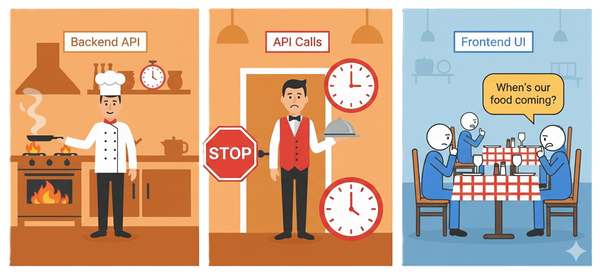
Initially, I was initializing these services sequentially in the main() method, which led to longer startup times as each service had to wait for the previous one to complete.
The Solution: Parallel Initialization with "Future.wait()"
To address this, I implemented a parallel initialization strategy using Dart’s Future.wait() method. This approach allows multiple asynchronous operations to run concurrently, significantly reducing the overall startup time.
Here’s the key part of the implementation:
Future<void> _initializeApp() async {
  await Future.wait([
    _initializeFirebase(),
    MobileAds.instance.initialize(),
    _initializeIsar(),
  ]);
}
Here’s the optimized main function that demonstrates how you can initialize multiple services in parallel:
void main() async {
  WidgetsFlutterBinding.ensureInitialized();
  // const isProduction = bool.fromEnvironment('dart.vm.product');

  // // Start Firebase initialization
  // final firebaseInit = await Firebase.initializeApp(
  //   name: 'LinkVault Singleton',
  //   options: isProduction
  //       ? prod.DefaultFirebaseOptions.currentPlatform
  //       : dev.DefaultFirebaseOptions.currentPlatform,
  // );

  // Run the app immediately, do other inits in the background
  runApp(
    ProviderScope(
      child: FutureBuilder(
        future: _initializeApp(),
        builder: (context, snapshot) {
          if (snapshot.connectionState == ConnectionState.waiting) {
            return MaterialApp(
              title: 'link_vault',
              debugShowCheckedModeBanner: false,
              theme: ThemeData(
                scaffoldBackgroundColor: Colors.white,
                appBarTheme: const AppBarTheme(
                  backgroundColor: Colors.white,
                ),
                primarySwatch:
                    Colors.green, // Change to your desired primary color
              ),
              home: Scaffold(
                body: Center(
                  child: SvgPicture.asset(
                    MediaRes.linkVaultLogoSVG,
                    height: 136,
                    width: 136,
                  ),
                ),
              ),
            );
          }

          return const MyApp(); // Create a simple splash screen widget
        },
      ),
    ),
  );
}

// Initializing All Non-Related Services Concurrently
// Thus Improving App Initial Loading Time
Future<void> _initializeApp() async {
  await Future.wait([
    _initializeFirebase(),
    MobileAds.instance.initialize(),
    _initializeIsar(),
  ]);
}

Future<void> _initializeFirebase() async {
  const isProduction = bool.fromEnvironment('dart.vm.product');

  // Start Firebase initialization
  await Firebase.initializeApp(
    name: 'LinkVault Singleton',
    options: isProduction
        ? prod.DefaultFirebaseOptions.currentPlatform
        : dev.DefaultFirebaseOptions.currentPlatform,
  );

  FirebaseFirestore.instance.settings = const Settings(
    persistenceEnabled: false,
    cacheSizeBytes: 5 * 1024 * 1024,
  );
  await FirebaseFirestore.instance.enableNetwork();
}

Future<void> _initializeIsar() async {
  if (Isar.instanceNames.isEmpty) {
    final dir = await getApplicationDocumentsDirectory();
    await Isar.open(
      [
        CollectionModelOfflineSchema,
        UrlImageSchema,
        ImagesByteDataSchema,
        UrlModelOfflineSchema,
      ],
      directory: dir.path,
    );
  }
}
This code ensures that Firebase, MobileAds, and Isar are initialized concurrently, potentially improving app launch times. However, it’s crucial to sequence certain initializations correctly, such as ensuring Firebase is fully initialized before accessing Firestore.
Breaking Down the Implementation
- Separate Initialization Functions: I created individual functions for each service initialization. This improves code readability and maintainability.
- Future.wait(): This method takes an iterable of Futures and returns a Future that completes when all the input Futures have completed.
- Parallel Execution: Firebase, MobileAds, and Isar now initialize concurrently, rather than waiting for each other.
- Await Completion: The
awaitkeyword ensures that_initializeApp()doesn't complete until all services are initialized.
Additional Optimizations
- Early Widget Binding: I call
WidgetsFlutterBinding.ensureInitialized()at the start ofmain()to prepare the Flutter engine. - Splash Screen During Initialization: I implemented a simple splash screen using
FutureBuilder, providing visual feedback while the app initializes.
Understanding Firebase Authentication Performance
One of the common considerations in app development is whether to use Firebase’s built-in authentication methods (FirebaseAuth.instance.currentUser) or implement a custom token-based system stored locally for checking if a user is logged in.
FirebaseAuth vs. Local Token Storage
Using FirebaseAuth.instance.currentUser is a straightforward and reliable way to check a user’s authentication status. It directly interacts with Firebase, ensuring real-time updates on the user’s state. On the other hand, storing tokens locally might offer slightly faster access but at the cost of additional complexity and potential security concerns.
After analyzing the performance, it’s clear that the speed difference between using FirebaseAuth.instance.currentUser and a locally stored token is minimal. Given FirebaseAuth’s reliability, using it for authentication checks is usually the better choice unless you have specific performance constraints or offline requirements.
Handling Asynchronous Initialization with Care
In the provided code, one of the critical considerations is where to place FirebaseFirestore.instance.enableNetwork(). Since this call re-enables network access for Firestore, it is typically fast and non-blocking, meaning it should not significantly impact the app’s initialization time.
However, it’s essential to ensure that Firebase is fully initialized before enabling Firestore’s network access to avoid issues related to uninitialized services. Placing Firestore initialization steps within the Firebase initialization function can help maintain a clear and logical flow.
Results and Benefits
- Faster Startup Times: By running initializations in parallel, the app launches noticeably faster.
- Improved User Experience: Users see the app’s content more quickly, leading to higher satisfaction.
- Efficient Resource Usage: Parallel initialization makes better use of device resources.
- Scalability: Adding new initialization tasks is straightforward, maintaining performance as the app grows.
Conclusion
Implementing parallel initialization with Future.wait() has significantly improved my app's startup performance. This approach not only enhances user experience but also sets a solid foundation for future app optimizations.
For Flutter developers looking to optimize their app’s initialization process, I highly recommend exploring the power of Future.wait(). It's a simple yet effective way to boost your app's performance right from the start.
Remember, in the world of mobile apps, every millisecond counts!